The editorial production system for corporate communications

Minutes, not mornings.

Blackwing runs the whole edition in one place: news monitoring, drafting from what you’ve already published, checks, approvals and a publish-ready edition. Your team keeps the last word.

  • Smart Monitor ranks the day’s news against your own archive
  • Drafts in your newsletter’s format, with a check that flags claims its sources don’t support
  • Sign-off by link, and a frozen record of exactly what went out
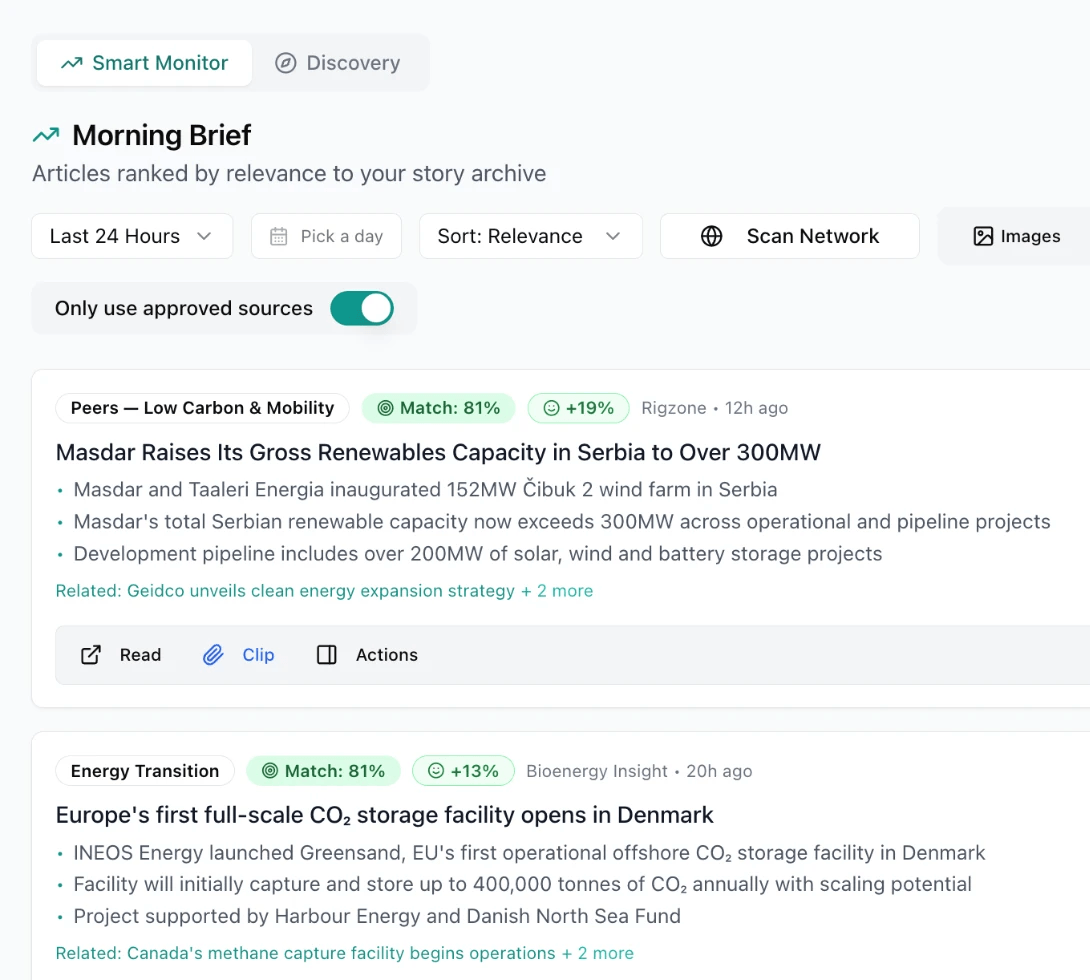
  1. Smart Monitor’s Morning Brief, “Articles ranked by relevance to your story archive”, with the Only use approved sources switch turned on. Two ranked articles are shown, each with a watchlist tag, a match score, a sentiment score, its source and age, three summary bullets and a Related line to past coverage; the first also shows Read, Clip and Actions controls.

    1 · Monitor Smart Monitor’s Morning Brief, with a match score on every article.

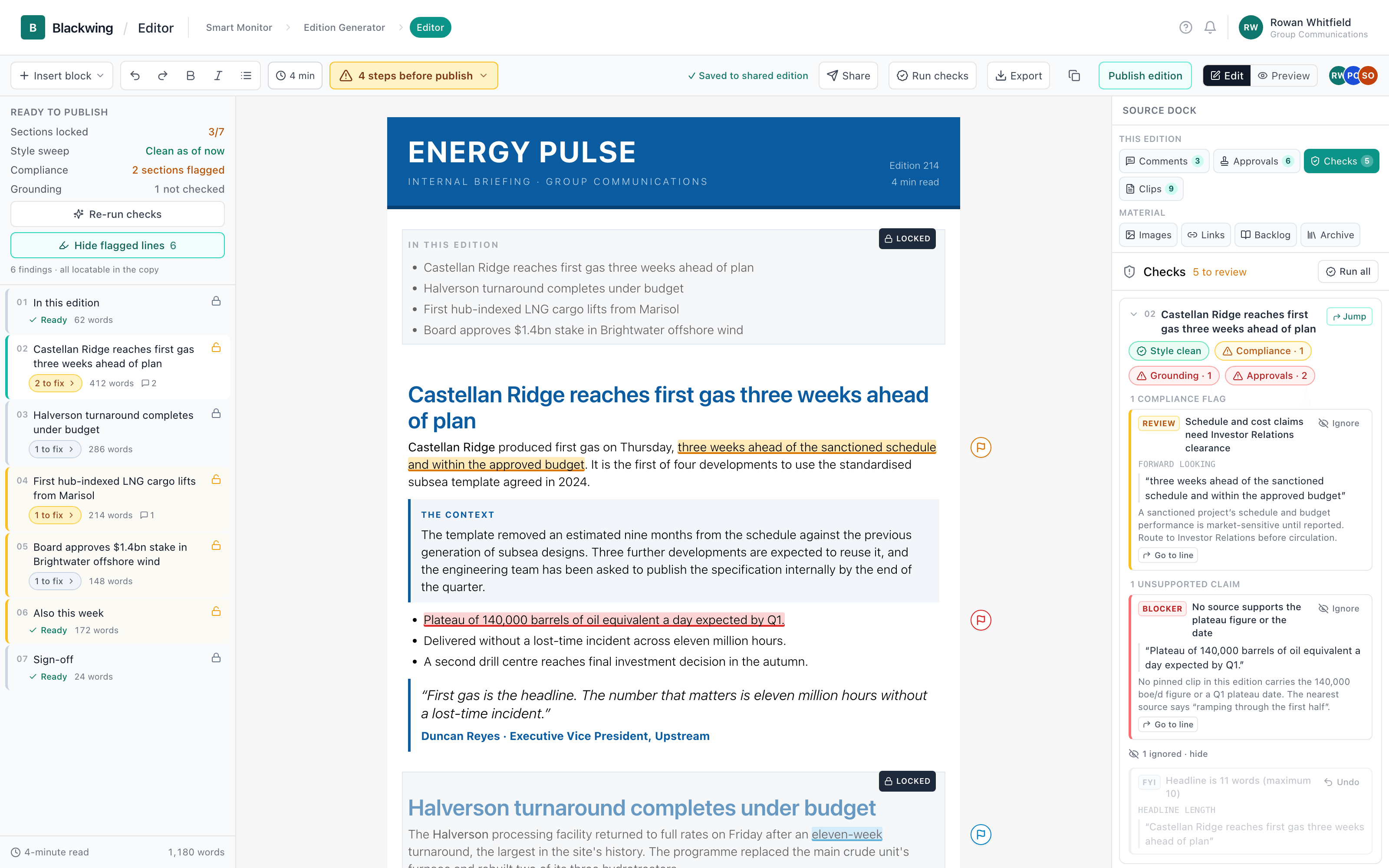
  2. The Blackwing editor with Energy Pulse Edition 214 open. A left rail shows Ready to publish (Sections locked 3/7, Style sweep clean as of now, Compliance 2 sections flagged, Grounding 1 not checked) and the edition’s seven sections. The canvas shows the masthead, an In this edition list and the lead story, “Castellan Ridge reaches first gas three weeks ahead of plan”, with one phrase highlighted amber and one bullet highlighted red, each with a flag pin in the margin, then a context box and a pull quote. The Source Dock on the right shows the Checks panel: Style clean, Compliance 1, Grounding 1, Approvals 2, a compliance flag and an unsupported-claim finding, each with Go to line.

    2 · Draft & review The draft in the editor, the checks’ findings marked on their lines.

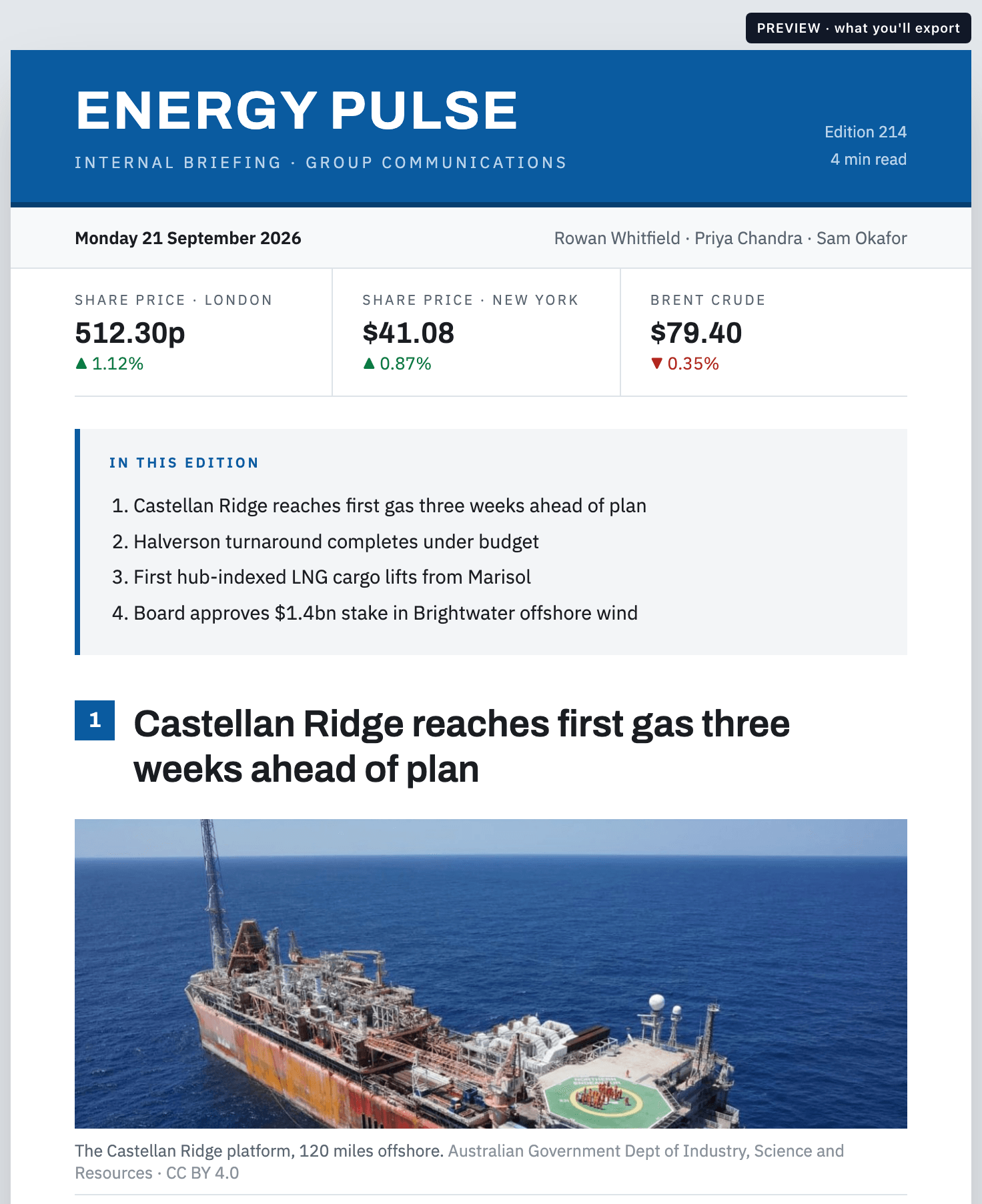
  3. The Energy Pulse newsletter in Preview, tagged “PREVIEW · what you’ll export”: a blue masthead reading Energy Pulse, Internal briefing · Group Communications, Edition 214, 4 min read; the date, Monday 21 September 2026, and the editors’ names; share prices in London and New York and the Brent Crude price; an In this edition list of four stories; and the lead story, “Castellan Ridge reaches first gas three weeks ahead of plan”, over a photograph of an offshore production vessel captioned “The Castellan Ridge platform, 120 miles offshore.”, with a photo credit.

    3 · Publish The finished edition, as it exports.

Smart Monitor

The day’s news, ranked against what you’ve already published.

Smart Monitor reads the sources you approve and scores every article against your own archive, so the stories closest to what you cover rise to the top — each with its match score, a three-bullet summary and the past coverage it relates to.

  • Approved sources only, switched on from the start
  • A match score on every article: how closely its headline and summary resemble the closest story in your archive
  • One click clips a story to your source dock
Smart Monitor’s Morning Brief, “Articles ranked by relevance to your story archive”, with the Only use approved sources switch turned on. Two ranked articles are shown, each with a watchlist tag, a match score, a sentiment score, its source and age, three summary bullets and a Related line to past coverage; the first also shows Read, Clip and Actions controls.
Smart Monitor’s Morning Brief: the day’s articles ranked by relevance to your archive, approved sources only.

Draft

A first draft in your newsletter’s own format.

Drop in a transcript, a speech or the same story from several outlets, and Blackwing drafts it in your newsletter’s format, working from the most similar stories you’ve already published.
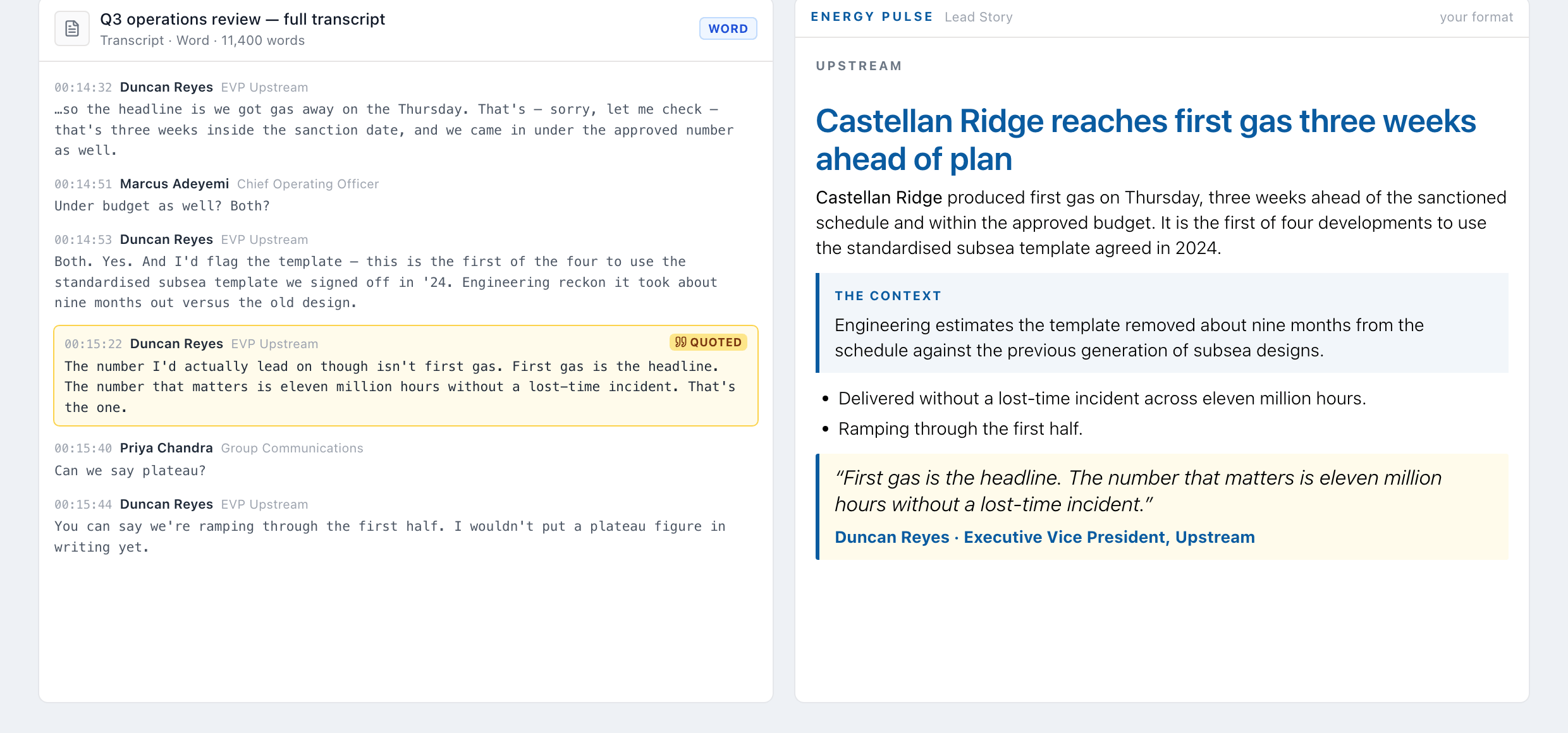
A meeting transcript on the left with the quoted line highlighted, and the story drafted from it on the right, where that line is the pull quote, with the speaker’s name and title under it.
  • Transcripts, briefings and filings in — PDF, Word or plain text
  • The same story from several outlets: what each one adds, for you to pick
  • Your style guide goes in once, as rules the draft follows and the house-style check reads

Review and approve

Your team keeps the last word.

Nothing publishes itself. Three checks flag what needs a person’s eye, and your team decides what changes.

  1. Grounding

    Checks that every fact in the story traces back to its source materials.

  2. Compliance

    Highlights the exact wording your legal team may need to see.

  3. House style

    Every story checked against your organization’s style guide.

The top of a story in the editor: a headline, an opening paragraph with one phrase highlighted amber, a shaded context box, and three bullets, the first highlighted red. An amber flag pin and a red flag pin sit in the right margin beside the two highlighted lines.
The checks panel: Style clean, Compliance 1, Grounding 1, Approvals 2, then a compliance finding marked Forward looking and an unsupported-claim finding marked Blocker, each with a Go to line link.
Two lines flagged on the story: one for compliance review, and one claim no source supports.

Outside reviewers work inside the platform

Invite someone from outside your team to one edition. They comment, or edit if you allow it, in threads your team answers. They can’t publish or export.
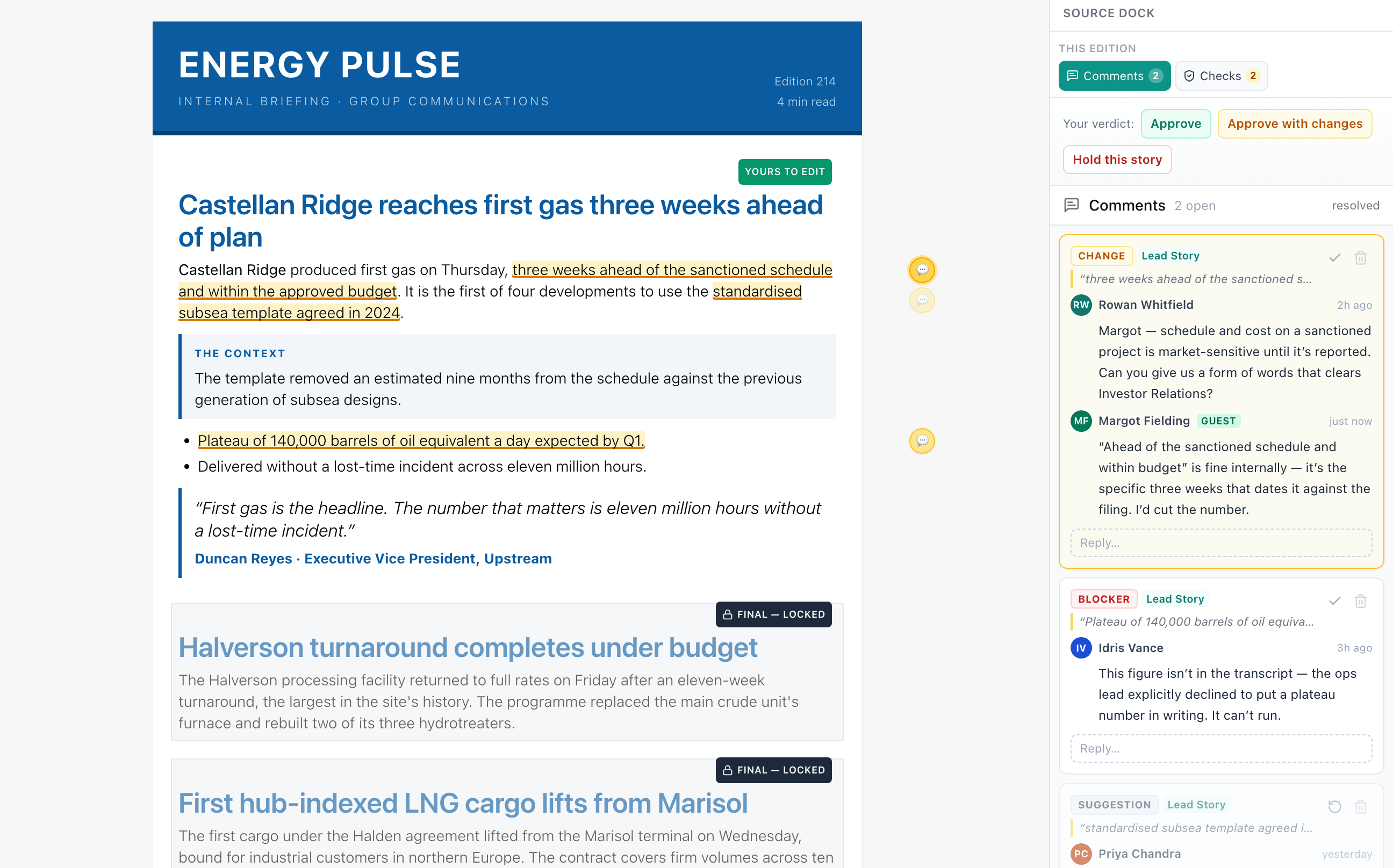
An outside reviewer’s view: stories your team has locked are read-only, and every comment sits in its thread.

Sign-off by link, on any phone

Each approver gets a link — no login, no app — and one tap records who decided and which exact words they cleared.

Blackwing uses the content of each story to learn who should clear it — the rules your team has set, and who has cleared work like it before — and it can learn your company’s org structure and use that too.

A phone showing the approver’s page: the Castellan Ridge story as it will appear — an opening paragraph, a paragraph headed “The context:”, three bullet points and a pull quote from Duncan Reyes, Executive Vice President — above the line “shown exactly as it will appear in the edition”. Then Approve, Approve with a comment and Request changes buttons; a note reading “Fine from Legal. The schedule and budget line needs Investor Relations before it runs.”; “Requested by Rowan Whitfield.”; and, under the card, “One tap records your decision. No login. Your comment reaches the editors and the writer at once.”
The approver’s page on a phone: the story exactly as it will appear in the edition, a note, and one tap to approve.
The Manage approvals panel for “Castellan Ridge reaches first gas three weeks ahead of plan”. Assigned · 4: Duncan Reyes and Callum Ridley, approved; Margot Fielding, Legal · Disclosure Counsel, awaiting; each due in 2h 40m; and Idris Vance, Investor Relations · Director, not sent yet. A line reads “Everyone already asked answers by Mon 21 Sept, 16:30 London · 10:30 US Central.” Suggested, “from this story and what has cleared before”: Regulatory counsel, house rule, “the story mentions ‘final investment decision’”; and Noor Haddad, “asked 6 times before”. Below: a Rank with AI link, a search box, an unticked “Ask in order” box, the answer-by time, an “Ask Idris Vance” button, and a note that Blackwing does not send anything.
Manage approvals: who is assigned, and who Blackwing suggests — from rules matched on the story’s words, and who has been asked before.

In parallel, or in order

Ask everyone at once, or in a chain where nobody is asked until the person before them clears. Edit the story afterward and the approval flags itself stale.

Four approver cards for one story, under a “Market-sensitive gate” label: Approved; Awaiting, due in 2h 40m; Draft, whose link opens when the approver before it clears; and Re-approve, with the note “The text changed after this was approved — it needs re-approving.”
Four approvers on one story: approved, awaiting, one whose link opens only when the person before them clears, and one who must re-approve because the text changed after they cleared it.

Plan

Your editions, deadlines and holidays on one calendar.

The editorial calendar puts your editions, company dates and results days in one month view, beside public holidays and religious observances — in layers you name, recolor and switch on and off.
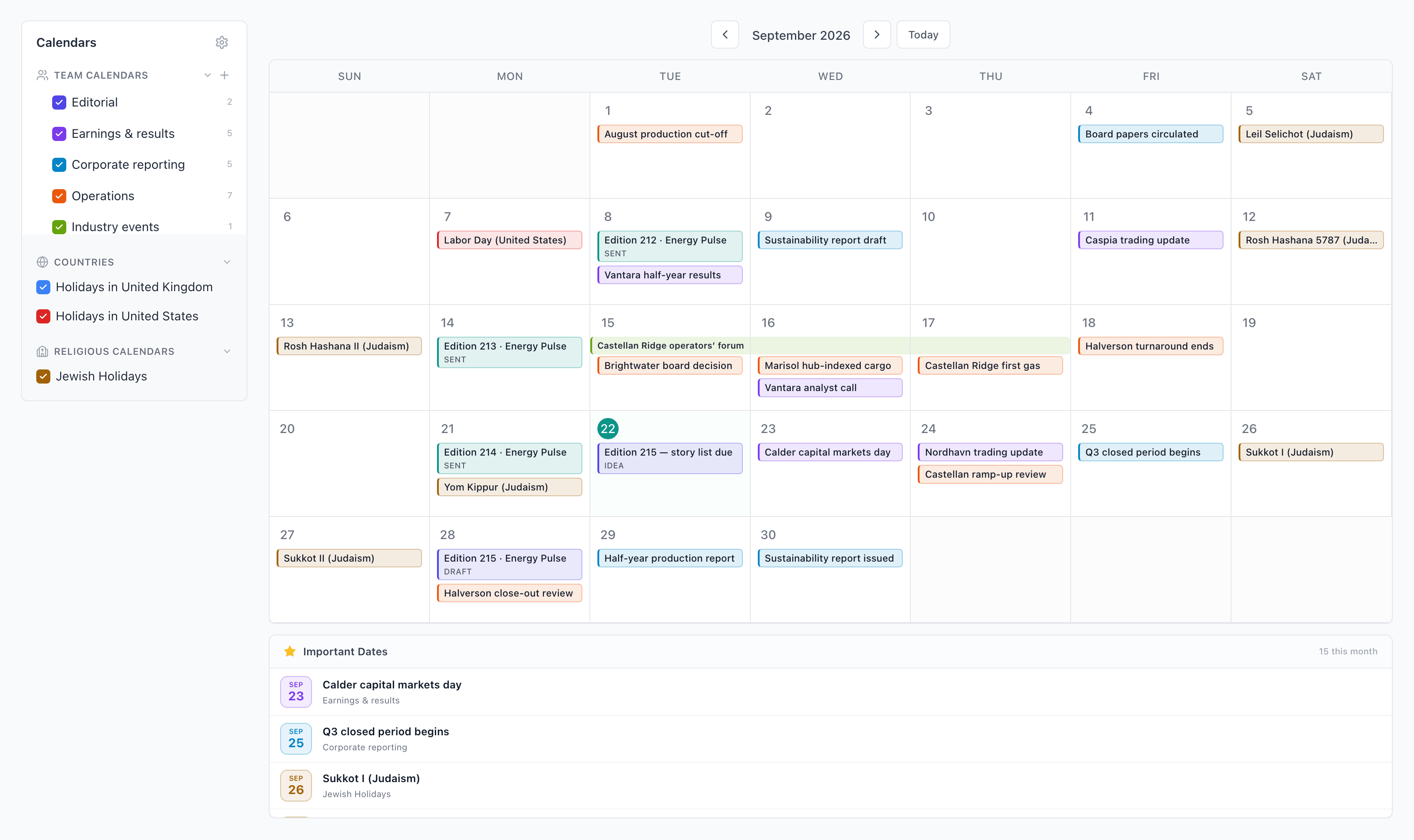
September in month view: the editions, company dates and results days, a public holiday and the Jewish observances, with the calendars down the side and the month’s important dates listed underneath.
  • Every published edition appears on it automatically
  • Mark a date as important and it’s listed under the calendar
  • Bring in a plan from a document you already keep

Security

How your content is protected.

Each customer’s content lives in its own database, the files you attach to a story are encrypted, and access is granted by role and module.

  • Your own database

    Each customer’s content lives in its own database, with its own search index — not a shared table filtered by customer ID.

  • Files encrypted at rest

    Documents attached to a story, and the original of every image in your library, are encrypted with AES-256-GCM — a unique initialization vector for each file and an integrity check on every read. In production, the application will not start without its key.

  • Access by role and module

    Role-based access, and each account can be granted only the parts of the product it needs. Invited guests can’t publish or export.

  • One gateway for AI

    Every call that drafts or checks your copy goes through one controlled gateway: an allowlist of permitted models, a cap on response size, and usage tracked per customer.

  • A person publishes

    Approvals and sign-off are part of the workflow, and a readiness check lists anything still outstanding before you publish. A person confirms every publish, and Publish History shows who approved what.

  • A record of what happened

    Significant actions are recorded centrally and stamped with the organization they belong to.

See it live.

Thirty minutes with your own material: monitor, draft, review, approve, publish. Not a slide about it.

Blackwing sits upstream of your email platform, intranet or app: when the edition is ready it leaves in one click, as send-ready HTML or clean copy.